Forensicating a MacBook in 2026 requires understanding an operating system built on decades of Unix heritage, proprietary security layers, and an ever-evolving threat landscape. This guide cuts through the complexity to focus on modern endpoint security as reference material through the practical lens of digital forensics.
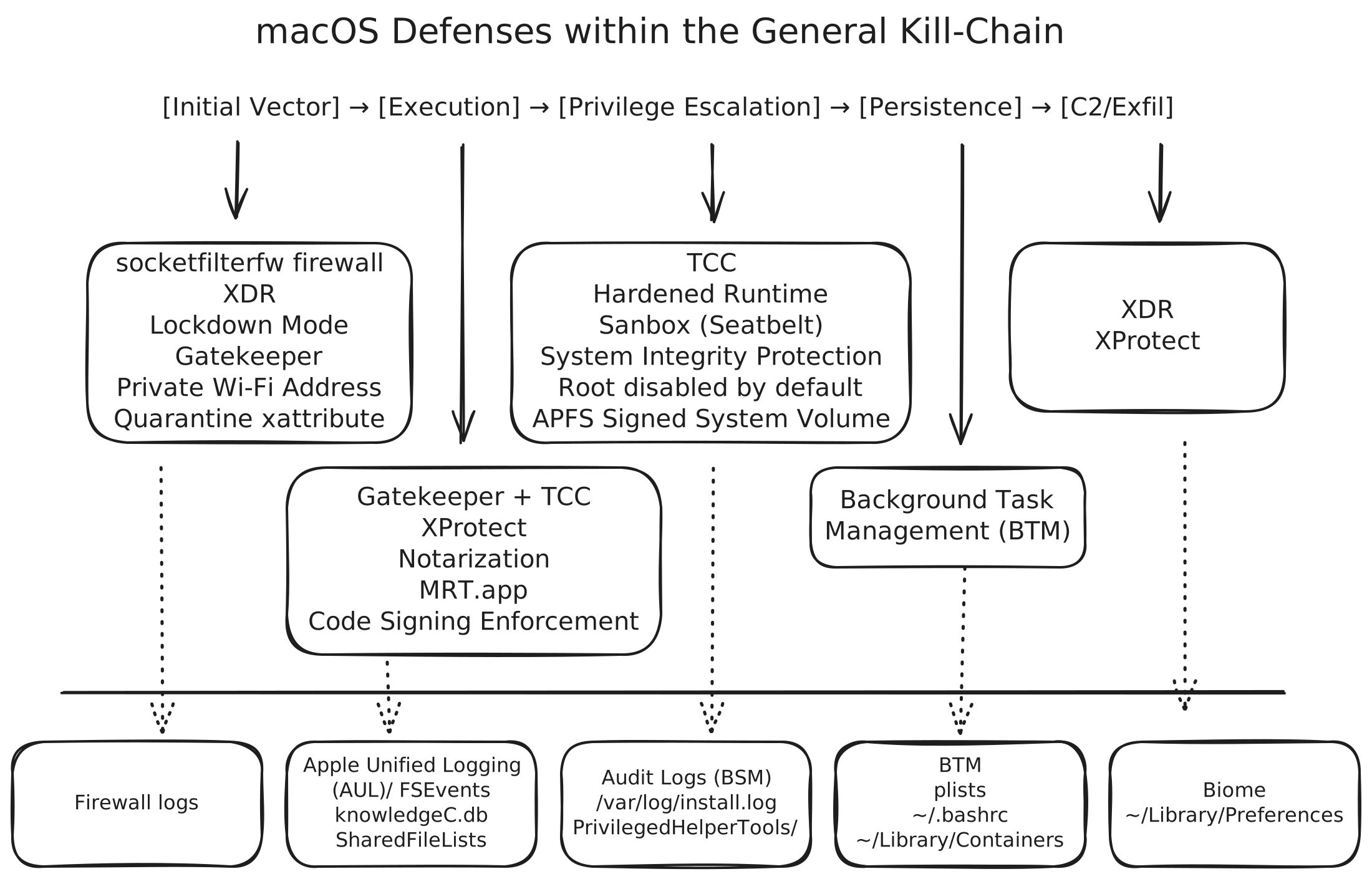
macOS Protections
Most MacBook compromises follow predictable patterns. This post examines three common attack vectors to illustrate how attackers exploit security gaps and how forensic analysts uncover them.
- A vulnerable service (SSH): A user enabling SSH with it being open to the internet, weak configs, and a bruteforceable user password.
- ClickFix: A phishing-style of attack to convince the user to
curl | bashmalware onto their systems. - A trojanized application: When users download an application thinking it was something else.
Initial Vector
SSH: MacBooks have two built-in firewalls, though firewalls are useless if not tuned to your specific setup.
Clickfix: ClickFix is particularly effective on macOS because, in the absence of an EDR, users are easily compromised. This occurs because Gatekeeper implicitly trusts Apple-certified binaries; making LoLBins (Living off the Land Binaries) a red team’s best friend. Since ClickFix is simply curl | bash both of those utilities are implicitly trusted as signed system binaries.
Trojan: The reason why you do not hear about as many trojanized applications is because of Gatekeeper and XProtect. Both check certificates (Notarization) and signatures (XProtect’s Yara scans), respectively, so that when they find a malicious app it will be flagged by XProtect and removed by MRT.app, moving it to ~/.Trash. These attacks rely on social engineering to convince the user that the application is legitimate, leading them to manually override Gatekeeper’s security warnings.
(Bonus) iMessage and Zero-Click: In rare cases where your users are the target of nation state level actors, Apple has created Lockdown Mode. This feature blocks message attachments, excludes location metadata when you share photos, disallows installation of configuration profiles, and even more. This can be enabled on iOS and watchOS devices too.
- A quarantine extended attribute (xattr) is attached to all files downloaded from the internet; like how Microsoft Windows has the Mark-of-the-Web.
- Gatekeeper is the enforcement mechanism (
syspolicyddaemon, withtrustdservice for certificate validation) that prevents quarantined applications from running unless they meet security requirements:- Signed with a valid Apple Developer certificate
- Notarized by Apple’s automated security scanning
- OR distributed via the Mac App Store
- Notarization is when developer’s apps pass Apple’s automated security scanning before distribution. If malware is later found in a notarized app, Apple can revoke that developer’s certificate, making all their apps untrusted for all macs everywhere.
- XProtect is Apple’s built-in YARA-based signature scanner that can send a malicious program to the ~/.Trash/ if found via the MRT. app(now called XProtect Remediator). It checks applications against known malware signatures when:
- An app is first launched
- An app’s code signature changes
- XProtect definitions are updated
- sshd is disabled by default. If enabled, consider hardening Secure Secure Shell
- Built-in firewalls includes an application-layer firewall (
socketfilterfw) and a packet-filter firewall (pfctl) & third-party (LittleSnitch or LuLu) firewalls to block incoming connections to apps.
### Gatekeeper ###
# Manually assess an application
spctl --assess --verbose /Applications/SuspiciousApp.app
# Gatekeeper denials
log show --predicate 'process == "syspolicyd" AND eventMessage CONTAINS "deny"' --last 7d

### Notarization ###
# Check if an app is notarized
spctl -a -vv -t install /path/to/app.app
# Look for: "source=Notarized Developer ID"

### XProtect ###
# XProtect definitions location
ls -la /Library/Apple/System/Library/CoreServices/XProtect.bundle/Contents/Resources/
# Check XProtect logs
log show --predicate 'process == "XProtect"' --last 7d

### Quarantine xattribute ###
# Check if file is quarantined
xattr -p com.apple.quarantine ~/path/suspicious.app
# SQLite database tracking all quarantined downloads
ls ~/Library/Preferences/com.apple.LaunchServices.QuarantineEventsV2

### Firewall ###
# View allowed applications
sudo /usr/libexec/ApplicationFirewall/socketfilterfw --listapps
# Check firewall logs
log show --predicate 'process == "socketfilterfw"' --last 24h
# Application Layer Firewall config
/Library/Preferences/com.apple.alf.plist
Execution
SSH: After successfully gaining a user persona on the system Darwin is pretty locked down. For starters, because APFS mounts the system partition as read-only, modifying files there is impossible. Even if an attacker manually remounts the volume, the Signed System Volume (SSV) feature provides a cryptographically verified seal that prevents unauthorized changes. Then whatever action attackers take will be logged (more on this in a later section). Also, any kernel level access is heavily restricted thanks to System Integrity Protection. Then there is the Hardened Runtime which makes it difficult for child processes to perform classic DLL Search Order hijacks, or in Mac-speak that is setting the DYLD_INSERT_LIBRARIES environment variable.
ClickFix: When a program is downloaded via curl or another signed system utility it will not receive the quarantine extended attribute. If the MacBook has the Terminal.app set to ‘Full Disk Access’ then when Gatekeeper assesses the process on execution it will not block the process or even warn the user of this nefarious behavior1. And if the malware attempts to access privacy-protected data or systems, the tccd daemon will check the TCC database to see if that application has permission to do so, or the user will be presented with a warning- and possibly the need to enter their password. Other malware has been seen leveraging AppleScript (osascript) for different execution avenues. What happens after execution depends on your corporate policies and your EDR.
Trojan: If a trojanized application writes itself to disk, Gatekeeper inspects it upon execution. This time, it cross-references the required permissions (declared in the app’s Info.plist) with the TCC database. Furthermore, these applications are confined by Sandbox profiles (aka Seatbelt), which enforce a default-deny policy that restricts the process to its own container in ~/Library/Containers/.
- APFS: Signed System Volume (SSV) is a cryptographically verified snapshot. Even if you mount the volume as read-write, the seal will break, and the system likely won’t boot. This is also the APFS feature which enforces the read-only mount of system volumes.
- Code Signing Enforcement is when native binaries must be signed by the kernel, or explicity allowed the user.
- AppleScript (
osascript) is an Apple-signed binary that executes script files. The scripts themselves don’t require code signing because they’re interpreted as data by the signed system utility. - Entitlements are exceptions to the default-deny policy set by Seatbelt.
- AppleScript (
- System Integrity Protection (SIP) is to lock down a MacBook where many features are impossible to access. SIP protects against malware like OSX/Clapzok that attempts to modify system binaries or injecting running code via DYLD_INSERT_LIBRARIES.
- Hardened Runtime is a code signing feature to prevent dynamically linked library hijacking and and a ’no WX’ policy to prevent memory tampering. Entitlements are the exception for this feature.
- TCC (Transparency, Consent, and Control) is Apple’s IAM permission system that forces apps to ask before accessing your camera, files, or screen.
- As of Sequoia (September 2024) TCC will prompt the user monthly for screen recording apps instead of one-time consent due.
- Private Wi-Fi Address is when MAC addresses rotate every two weeks to prevent Wi-Fi tracking.
- FileVault is the full-disk encryption to protect data at rest.
- QuickLook the thumbnail cache.
- knowledgeC.db the User Application Usage database.
- Biome is the new user activity framework, supplements knowledgeC.db data.
- sidebarlists.plist contains a historical list of attached volumes.
- SharedFileLists think of these as a Most Recently Used cache.
# Verify code signature
codesign -dv --verbose=4 ~/path/suspicious.app
# Display entitlements
codesign -d --entitlements :- ~/path/suspicious.app

# Check SIP status
csrutil status

# Check FileVault status
fdesetup status

# Inspect QuickLook
sqlite3 $(getconf DARWIN_USER_CACHE_DIR)/com.apple.QuickLook.thumbnailcache/index.sqlite
# Disable QuickLook
qlmanage -r disablecache

# List of applications
~/Library/Preferences/
# Check for User Application Usage
sqlite3 ~/Library/Application\ Support/Knowledge/knowledgeC.db
# Biome location
~/Library/Biome/streams/public
# Document revision metadata
~/.DocumentRevisions-V100
# App state and recent documents
~/Library/Saved\ Application\ State/
# Historical list of attached volumes
~/Library/Preferences/com.apple.sidebarlists.plist
# Bluetooth device history
~/Library/Preferences/com.apple.Bluetooth.plist
# Device connection timestamps
/Users/$USER/Library/Preferences/com.apple.iPod.plist
# List of files with metadata and creation dates
~/.Spotlight-V100
Privilege Escalation
Common privilege escalation paths include exploiting vulnerable system processes, abusing file permissions, or social engineering users to install privileged helpers (PrivilegedHelperTools via SMJobBless).
- Sandboxes do a pretty good job when overly permissive entitlements are kept in check (Microsoft products).
rootis disabled by default.
Persistence
I figured it would be easier to just list the artifacts and leave the how as an exercise for the reader.
| Location / Artifact | Scope | Protected? | Check Command |
|---|---|---|---|
| LaunchAgents (User) | User | TCC | plutil -p ~/Library/LaunchAgents/suspicious.plist and DYLD_INSERT_LIBRARIES |
| LaunchDaemons | System | TCC | sudo ls -la /Library/LaunchDaemons/ |
| LaunchAgents (System) | All Users | No | sudo ls -la /Library/LaunchAgents/ |
| Login Items (BTM) | User | TCC | sfltool dumpbtm |
| Login Items (Legacy) | User | TCC | osascript -e 'tell app "System Events" to get properties of login items' |
| Configuration Profiles | System/User | Yes | profiles list -a or ls -la /var/db/ConfigurationProfiles/ |
| Kernel Extensions (Kexts) | System | SIP | kmutil inspect or kextstat | grep -v com.apple |
| System Extensions | System | SIP/TCC | systemextensionsctl list |
| LoginHooks / LogoutHooks | System | No | sudo defaults read com.apple.loginwindow LoginHook |
| Cron Jobs | User/Sys | Partial | crontab -l; sudo crontab -l |
| Shell Profiles | User | No | cat ~/.zshrc ~/.bash_profile ~/.bashrc |
| Folder Actions | User | No | ls -la ~/Library/Workflows/Applications/Folder\ Actions/ |
| Periodic Scripts | System | SIP | ls -la /etc/periodic/{daily,weekly,monthly}/ |
| Emond Rules | System | SIP | ls -la /etc/emond.d/rules/ |
| At Jobs | User | No | atq; sudo atq |
| PrivilegedHelperTools | System | TCC | sudo ls -la /Library/PrivilegedHelperTools/ |
| Email Rules | User | No | osascript -e 'tell app "Mail"' |
C2 Threats
At this stage if a command-and-control agent is running on your system it does not matter how the attacker got in. Detection relies primarily on your EDR solution. Or you may get lucky and the attacker will drop a known malware so XProtect will trash it, alert the EDR, and automation will kick in to protect the host. Usually the attacker will begin with the exfiltration of some host data. If it is system data they are going after the following information may be what they are after.
- DNSSec can be enabled via configuration profiles (not enabled by default).
- NVRAM stores Wi-Fi networks
# View saved networks (including hidden ones)
sudo /System/Library/PrivateFrameworks/Apple80211.framework/Resources/airport -s

# List Wi-Fi networks host has connected to
sudo nvram 36C28AB5-6566-4C50-9EBD-CBB920F83843:current-network

# Monitor outbound connections with lsof
sudo lsof -i -n -P | grep -v "ESTABLISHED"

# Check DNS settings
scutil --dns

# DNS queries
log show --predicate 'process == "mDNSResponder"' --last 24h | grep -i query

# Take a picture
screencapture -x /tmp/screen.png

# Where tcc does not check
ls -lathr ~/Downloads/ ~/Public/ /Users/Shared/ /tmp/
(Bonus) Logging
| System / Tool | Scope | Key Location(s) | Access Command / Method |
|---|---|---|---|
| Apple Unified Log | Modern primary log (Replaces ASL/Syslog). Structured binary data. | /var/db/diagnostics/ | log show, log stream, Console.app |
| OpenBSM (Audit) | Security auditing (logins, file access, kernel events). Compliance focus. | /var/audit/, /etc/security/ | praudit, auditreduce, audit -n |
| FSEvents | Historic record of every file system change (add/move/delete). | /.fseventsd/ (per volume) | FSEventsParser (3rd party) |
| DTrace / xctrace | Dynamic tracing of kernel and user-space calls (Live/Profiling). | N/A (Dynamic) | sudo dtrace, xctrace (Xcode) |
| Sysdiagnose | Comprehensive “Black Box” system state snapshot (massive archive). | /private/var/tmp/ | sudo sysdiagnose or Cmd+Opt+Ctrl+Shift+. |
| Endpoint Security | Real-time monitoring for security tools (EAL/Kext replacement). | System Extension based | ES Client API (requires entitlement) |
| Application data stored in Containers | Because of how apps are sandboxed the application data is canonically together per user; not to be confused with Docker/OCI containers. | ~/Library/Containers/Application Support/<program.app>/data | Data will usually be in sqlite3 format: sqlite <program>.sql |
- macOS uses BSD strings utility which only finds ASCII character sequences. You will need GNU String to find the other encoding types.
- Evidence of execution is tracked in both user and system artifacts (ie. Biome), so even if the user cleared their Biome data (ie
rm -rf ~/Library/Biome/) artifacts may still persist in the system-level location. However, the system location primarily stores synced data from other devices on the same AppleID, not duplicate local execution evidence. - Google’s prevention agent Santa for MacBooks.
- mac-apt is a preferred artifact parsing all-in-one tool.
- Mandiant’s macos-UnifiedLogs is the preferred AUL parser.
# Write logs to the unified log instead of stdout
sudo eslogger --oslog exec

# Expose hidden files and Library folder in Finder:
defaults write com.apple.finder AppleShowAllFiles -bool true
chflags nohidden ~/Library

# Show all filename extensions (so that "Evil.jpg.app" cannot masquerade easily)
defaults write NSGlobalDomain AppleShowAllExtensions -bool true

# Pull Apple Unified Log
log show --predicate 'eventMessage contains "12345"' --style syslog --last 24h
Wrap-Up
As with all my posts, if you believe there’s something I got wrong or left out feel free to reach out so I can learn.
Shout out to Phil Stokes and Olivia Gallucci for most of my learning, so far.
Stay curious2, stay updated, and always verify your plists.